
Screenshots
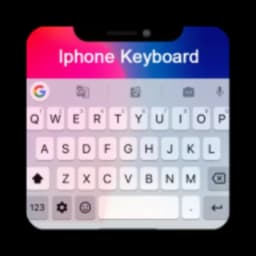
About iPhone Keyboard - iOS 18
iPhone Keyboard - iOS 18 brings iOS-style typing to your Android device with smooth gesture input, extensive emoji libraries, and customizable themes that transform how you message and write.
Get the iPhone typing experience without switching devices. This keyboard app delivers iOS 18 emojis, sleek fonts, and voice-to-text functionality so you can type faster and express yourself with style. Over 5,000 emojis and GIFs let you add personality to every conversation, while predictive text and auto-correct keep your messages accurate and effortless. Speak to write when your hands are full — simply dictate your message and watch it appear instantly.
Customize every detail of your keyboard to match your personality. Choose from hundreds of themes including glitter, nature, sports, cartoon, and gradient designs in black, gray, neon, and vibrant color schemes. Add your own background images and favorite colors to create a keyboard theme that's uniquely yours. Switch themes anytime to match your mood or express yourself to friends and followers.
Gesture typing makes input faster and more accurate — swipe across letters to form words without lifting your finger. The keyboard supports multiple languages, so users worldwide can type in their preferred language seamlessly. Whether you need quick responses or detailed messages, this keyboard adapts to your typing style with intelligent predictions and emoji suggestions that appear as you type.
Setup takes seconds: download the app, tap Apply, set it as your default keyboard, and start typing with iOS style. The keyboard works across all your messaging apps, email, social media, and any text field on your device. No complicated settings or steep learning curve — just download and enjoy a fresh, modern typing experience.
Performance and convenience combine in one app. Fast word prediction, accurate auto-correct, and smart emoji suggestions reduce typing errors and speed up texting. Voice input eliminates typing entirely when you're driving, cooking, or simply prefer hands-free messaging. The result is typing that feels smoother, faster, and more enjoyable than your device's standard keyboard.
IPhone Keyboard - iOS 18 is free to download and use, giving every Android user access to iOS-style typing without cost. Whether you're a casual texter, social media enthusiast, or someone who values stylish design, this keyboard delivers both function and flair. Transform your Android device today and experience typing the way iPhone users do.
Pros & Cons
Pros
- Gesture typing speeds up text entry without lifting your finger
- Over 5,000 emojis and GIFs let you express yourself visually
- Voice-to-text feature enables hands-free messaging while driving or cooking
- Hundreds of customizable themes match your mood and personal style
Cons
- Free app likely includes ads or in-app purchases not detailed upfront
- Requires setting as default keyboard and enabling keyboard permissions
- Predictive text and voice recognition depend on stable internet connection
- Third-party keyboard may lack feature parity with Android's native options
Related Apps

AlienGUIse
Desktop themes and manager for Windows — transform your system with 5 futuristic designs.

SharpKeys
Remap keyboard keys to launch apps, media controls, and custom commands on Windows.

RocketDock
Desktop launcher for Windows — quick access dock with customizable icons and positioning.

Custom Resolution Utility (CRU)
Display resolution utility: Create custom resolutions for your monitor with precise refresh rate control.

Lagguy Wallpapers
Lagguy
4K & HD wallpapers for Android — minimal, abstract, nature, AMOLED designs with lifetime access

Lock Screen OS
Apps Genz
Customize your lock screen with widgets, photos, and notifications. Replace Android's default lock screen.
Latest Articles

Play a free Color Ball Sort Puzzle-style game in your browser (no download)
Oct 6, 2026

Play a free Beach Buggy Racing-style kart racer in your browser (no download)
Oct 6, 2026

Play a free Alto's Adventure-style game in your browser (no download)
Oct 6, 2026

Free online whiteboard like Jamboard: use Quickboard in your browser, no signup
Oct 6, 2026

Free online running pace calculator: splits, race predictor and daily challenge, no download
Oct 6, 2026